Every good answer has a location
When a visitor asks Via where to grab dinner near the river or what to do on a rainy afternoon, the recommendation is only half the answer. The other half is where. Until now, seeing that meant leaving the conversation for the map and then finding the way back.
A map in the middle of the conversation
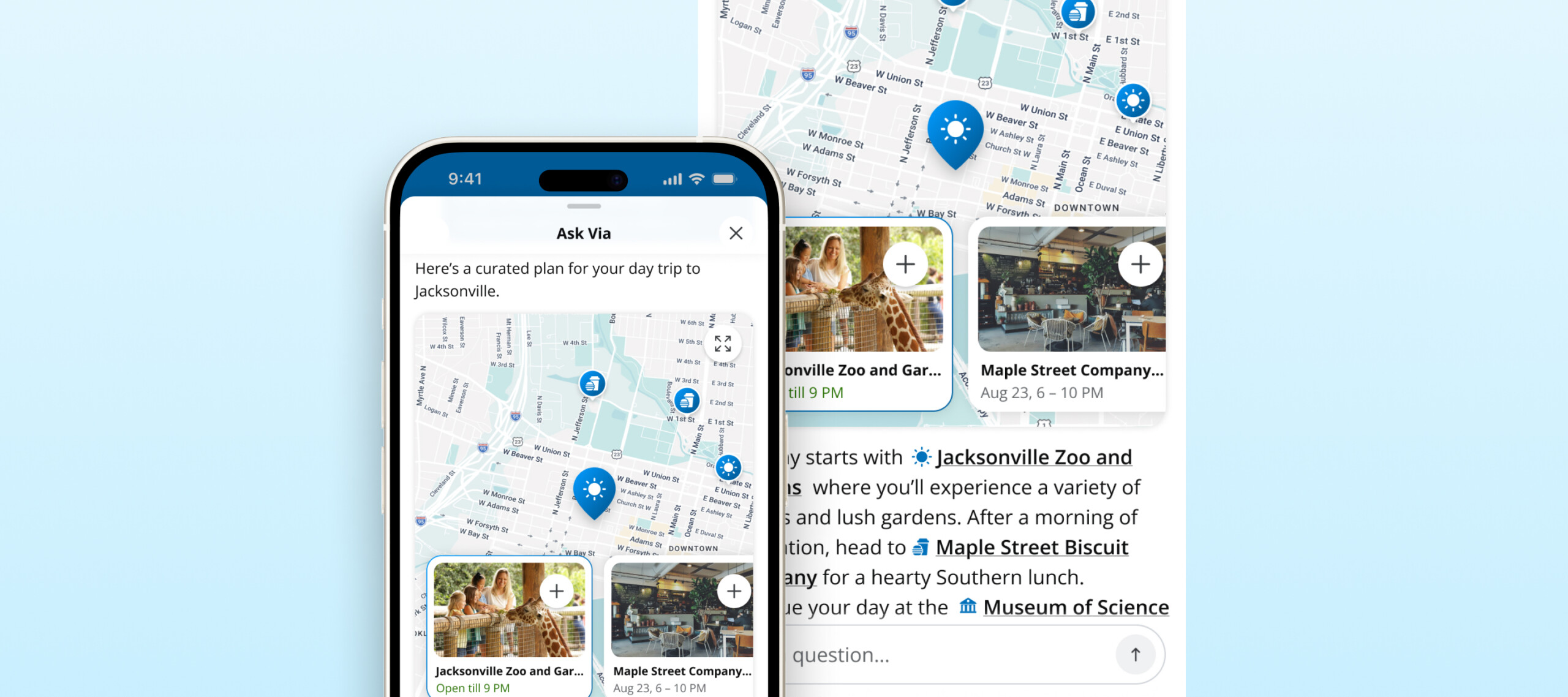
Whenever a Via response recommends places or events, an interactive map now renders inside the reply, placed where it belongs in the answer rather than tacked on at the end. Each recommendation gets a pin with its category icon, and a scrollable row of listing cards runs along the bottom in the same order as the response.
How it works for visitors & locals
- Ask Via. “Plan me a day downtown” or “Where can we eat outside tonight?”
- See the map. Pins and listing cards appear right inside the reply.
- Tap a pin. Its card highlights and scrolls into view.
- Tap a card. The full listing opens, with hours, photos, and details.
- Go full screen. The expand button opens a full-screen map to pan and zoom. Close it and the visitor is back in the chat right where they left off.
When several recommendations sit close together, they group into a single numbered pin. Tap it and the map zooms in to separate them.
How it works
1. Pick what goes in the portal. At kickoff, we work with you and your city partners on the departments, report types, and service links residents need most.
2. We build it. Our team configures the portal home screen, the report form and its routing, and the department directory.
3. The city shares the unlock. You get a QR code and access link to put in front of residents wherever they already look.
4. Residents scan once. The portal unlocks in the app they already have. No second download.
5. You manage it like everything else. Content and messaging live in the same tools your team uses today.
Where it shows up
- Branded mobile apps on iOS and Android
- The standalone Via chat on your website
- Mobile web
On desktop, the widget keeps its current row of listing cards for now.
Good to know
- Nothing to set up. Maps appear automatically for Via clients. App users see them on the latest version of your app.
- Only what’s on the map gets a pin. Virtual events and listings without an address still get a card, just not a pin.
- Everything else looks the same. Answers without recommendations read exactly as they do today.
- Past conversations keep their maps. Earlier maps in a conversation show as a still preview. Tap one to open its full-screen map.
- Your data, your listings. Pins and cards come from the same listings that power the rest of your app, so names, photos, and hours match everywhere.